Tutorial
Binary command (C language)
$ mkdir pong
$ cd pong
$ bpm new
This project is :
1) A binary program
2) A library
3) A rom
answer ? 1
Init bpm.tml
Init src folder
Init src/tmp.c
Init VERSION file
Add github action main.yml into project: y/N ?N
initialized
Set oricutron path (global)
~$ bpm config oricutron_path /mnt/c/Users/myfolder/OneDrive/oric/oricutron_plugins/oricutron
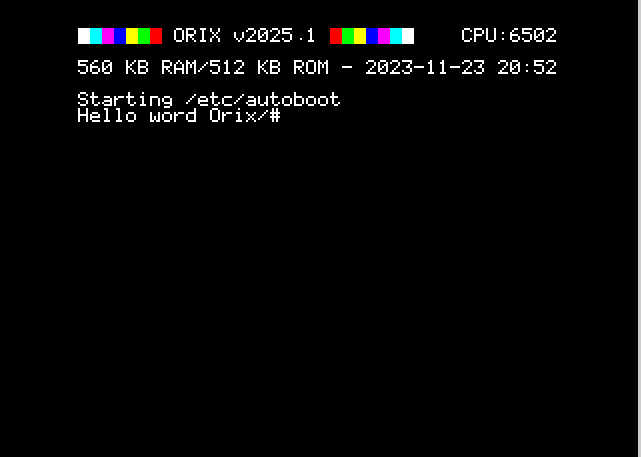
~$ bpm run
Library (Assembly language only)
~$ mkdir gizmo && cd gizmo
~$ bpm new
This project is :
1) A binary program
2) A library
3) A rom
answer ?2
Init .gitignore
Init bpm.tml
Init src folder
Init VERSION file
Add github action main.yml into project: y/N ?N
initialized
~$ tree
.
├── bpm.tml
├── docs
├── src
│   └── dynamic_lib
│       └── gizmo.s
└── VERSION

~$ bpm build
Creating build/etc/bpm/gizmo/2025.1
Generate gizmo.lib
Building gizmo.llo
No build done

~$ tree
.
├── bpm.tml
├── bpmtmp
│   └── gizmo.o
├── build
│   ├── etc
│   │   └── bpm
│   │       └── gizmo
│   │           └── 2025.1
│   │               └── bpm.tml
│   └── usr
│       ├── lib
│       │   └── gizmo
│       │       └── 2025.1
│       │           └── llo
│       │               └── gizmo.lib
│       └── share
│           └── gizmo
│               └── 2025.1
├── docs
├── src
│   └── dynamic_lib
│       ├── gizmo.s
│       ├── gizmo_so.o
│       └── gizmo_so.s
└── VERSION
Add a binary to test a library :
This commands add "curl" binary name with "tests/curl.c" path and "arg1 arg2" which will be passed into Orix path
bpm config add project binary curl tests/curl.c "arg1 arg2"
First steps
First start
bpm needs 'Oricutron' and 'cc65' in order to work properly.
Theses binaries must be installed and cc65 (as ca65, ar65, ld65 must be in your PATH).
Initialize bpm and install plugins
Each day "bpm" will check if a new version is available and will ask if you want to install this version
~$ bpm
it will install all plugins
~$ bpm plugins
Use 'bpm plugins -h' for 'plugins' help
md2hlp: Build markdown into hlp file (text mode) [Installed]
orixsdk: Useful ca65 macro for Orix and reloc binary (Mandatory for Orix projects)  (Available versions : ['2023.3.0']) [Installed]
asm_bin_tpl: Assembly binary template for Orix  (Available versions : ['2024.4']) [Installed]
asm_rom_tpl: Assembly rom template for Orix  (Available versions : ['2024.4']) [Installed]
github_action: Template for github action  (Available versions : ['2024.4']) [Installed]
generatedoc: Tool to comment source code and generate markdown  (Available versions : ['2025.1']) [Installed]
First project
We create a binary from which will be loaded from /bin orix folder
~$ mkdir myprgm
~$ bpm new
This project is :
1) A binary program
2) A library
3) A rom
answer ?
Press 1
Init .gitignore
Init bpm.tml
Init src folder
Init src/myprgm.c
Init VERSION file
Add github action main.yml into project: y/N ?
Press N
initialized
~$ cat src/myprgm.c
#include <stdio.h>
int main() {
  printf("Hello world");
  return 0;
}
Launch build
~$ bpm build
Creating build/etc/bpm/myprgm/2025.1
Format 2 overhead:  304 304 1 2424 303
Generate file ...
-Generate file version: 2
-Truncate reloc table from 304 to 303 (-0.33%)
Built : build/bin/myprogram
Publish to bpm repository
Check publish key
If this command returns an empty line :
set | grep BPM
BPM_PUBLISH_KEY=yourKey
The publish key is not available. Ask one to jede[at]oric[dot]org and set key for publishing
~$ vi ~/.bashrc
add :
export BPM_PUBLISH_KEY=yourKey
. ~/.bashrc
$ bpm publish
Get a package from repository library for current project
'bpm search' list all available package.
$ bpm search
orixsdk 2023.3 -   Orix Software Toolkit
netdb 2024.4 -  Network database operations
ksocket 2025.1 -  Only use this package in Kernel source code (socket management part)
ch395 2024.4 -  ch395 low hardware routine. Use socket lib for socket management under Orix
kch395 2025.1 -  Only for orix kernel
inet 2025.1 -  Provide inet_aton
socket 2025.2 -  Socket management https://orix-software.github.io/socketlib/api/
curl 2025.1 -  Curl lib for Orix https://orix-software.github.io/curllib/api/
$bpm add netdb@2024.4
it will be added in "bpm.tml" manifest
Use orixsdk macro in project
Verify if orixsdk plugins is installed (installed flag):
bpm plugins
Use 'bpm plugins -h' for 'plugins' help
md2hlp: Build markdown into hlp file (text mode) [Installed]
orixsdk: Useful ca65 macro for Orix and reloc binary (Mandatory for Orix projects)  (Available versions : ['2023.3.0']) *[Installed]*
asm_bin_tpl: Assembly binary template for Orix  (Available versions : ['2024.4']) [Installed]
asm_rom_tpl: Assembly rom template for Orix  (Available versions : ['2024.4']) [Installed]
github_action: Template for github action  (Available versions : ['2024.4']) [Installed]
generatedoc: Tool to comment source code and generate markdown  (Available versions : ['2025.1']) [Installed]
if the plugins is activated, macro in the project assembly code can be loaded like :
.include "SDK_memory.mac"
Add a 'pre' script before the project command is launched
~$ mkdir scripts/
~$ echo "netchk" > scripts/network.sub
~$ bpm config set project orix_run_pre_script scripts/network.sub
In that case, scripts/network.sub will be executed before the binary project when 'bpm run' is launched.
Add a md2hlp file to project
This is done with 'bpm doc' which will try to find in docs folder ${name}.md and will be used by bpm to generate md2hlp file.
Create a file with "name" of the binary and build man page in markdown format. Launch "bpm doc" to generate .hlp for orix
Example with "myprogram" :
~$ vi docs/myprogram.md
~$ bpm doc
Manage 2 differents binaries with two differents source code in src/ folder
Add a new binary (see 'bpm config'):
bpm config add project binary curl tests/curl.c
Launch a specific project binary
bpm run --bin zx02cat
with args (ex with 2 args: bpm1.zx2 bpm.tml)
bpm run -- bpm1.zx2 bpm.tml --bin dzx02
Disable build (if it needs to use external tool)
Use 'enable_build' flag to False.
In that case, make can be used for build command. Bpm can be uses to manage dependencies and run.